


WaveFlow – Offline Music
3.9127.00 Reviews
App Specs
- Version
- 1.3.8
- Updated On
- License
- Free
- Downloads
- 5,000,000+
- Developer
- SmarTtDev
- Categories
- Music & Audio
- Platform
- Android
Screenshots
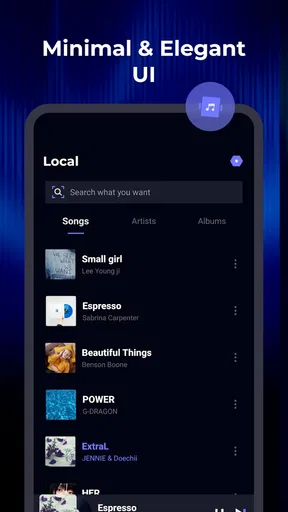
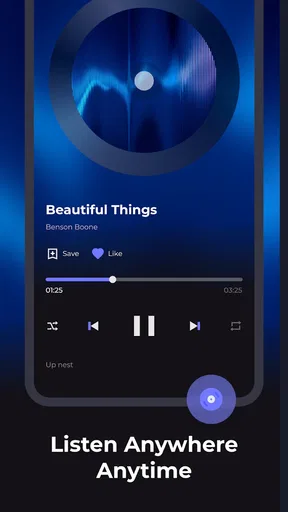
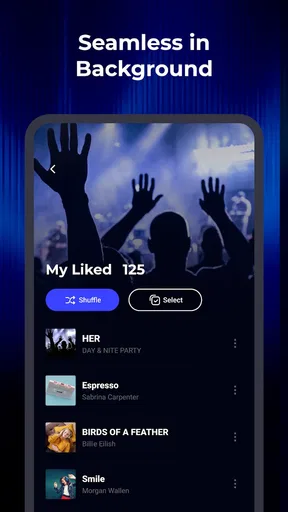
 Analysis by AppCompare
I judge an offline music player less by grand promises than by what it lets me do when my usual listening routine breaks: a train loses signal, a mobile plan is nearly used up, or I want the same album without depending on a streaming service. That is the practical appeal of WaveFlow – Offline Music. It is a free music and audio app from SmarTtDev, aimed at keeping personal listening available when an internet connection is inconvenient or unavailable. Its focus is useful, but it is worth separating that core idea from claims about features that may not match your own setup.
For someone choosing between a streaming app and a local player, the key question is where their music comes from. WaveFlow is most relevant if you already have audio you can keep on your device, or a workflow that allows you to prepare tracks before heading out. Offline playback can make a commute more predictable, but it does not automatically mean every song from a streaming catalog is available to save. I would decide based on the files and playlists I can actually bring into my library, rather than assuming the app replaces a paid music service.
A useful starting point for a personal library
WaveFlow’s stated purpose is offline listening, so I see it as a companion for a collection I want to carry with me, not as a tool for producing music or publishing creative work. That distinction matters: the editorial workflow here is about preparing a listening library, keeping it organized, and making sure it is ready for the moment I need it. If you create playlists for workouts, study sessions, or travel, the useful starting point is deciding which tracks belong on the device and how you want to group them.
Its audience reach suggests that many people are at least curious about this kind of listening. WaveFlow has passed five million installs, and its average rating is 3.9 from around 6,800 ratings, with 127 written reviews. Those figures give a broad snapshot, not a guarantee that it will fit every library. The app is rated for Everyone, and it runs on Android 8.0 or later; the current version is 1.3.8. I would still check that my device and music setup suit it before moving a large collection over.
The first practical test I would make is deliberately small: put a few familiar tracks in the library, build one short playlist, and try it with the phone offline. That tells me whether the basic routine makes sense before I spend time organizing everything. It also avoids confusing a connection problem with an app problem. For a listener who already keeps local music, this simple trial is more informative than starting with an ambitious library migration.
Your Music, Your Way
When I first got my hands on WaveFlow – Offline Music, the first thing that stood out was its sleek and user-friendly interface. Navigating through the app was a breeze, even for someone like me who's not exactly tech-savvy. The design is simple yet stylish, with intuitive controls that make music management a piece of cake.
The app lets you download your favorite songs and albums directly to your device. This means no more buffering or interruptions when you're out and about. Whether you're on a plane with no Wi-Fi or jogging through a park, your music is right there with you without any hiccups.
Worth Reading Before You Choose

Flipboard Shows What News Apps Must Do Beyond the Feed

Switching to Android Auto Means Rethinking Your Driving Routine

Google Calendar Makes a Crowded Week Easier to Manage

Ludo King Makes the Most of the Minutes Between Plans

Baby Panda World Brings Quick Play to Modern Phones, but Its Game Library Feels Busy

ESPN’s Live Game View Makes Following Close Games Easier
Seamless Integration
One of the standout features of WaveFlow is its seamless integration with various music platforms. You can easily import your existing playlists from other services, ensuring all your tunes are in one place. This was a game-changer for me, as I didn't have to go through the hassle of creating new playlists from scratch.
The app supports a wide range of formats, so your diverse music library isn't limited. From MP3s to more niche formats, WaveFlow has got you covered. Plus, the sound quality is top-notch, making sure your listening experience is as good as it gets.
Personalized Playlists
One of my favorite features is the ability to create personalized playlists based on mood, genre, or even activities. The app offers smart suggestions that help you discover new tracks similar to your favorites. It's like having your very own DJ curating the perfect playlist for every occasion.
And if you're someone who loves to mix things up, the shuffle feature is a perfect companion. Randomizing your playlists keeps things fresh and exciting, ensuring you never get bored of your music library.
Planning for offline listening
Offline playback works best when I treat preparation as part of the listening routine. Before a long trip, I would choose a compact set of albums or playlists rather than trying to carry my entire collection. A smaller selection is easier to check, leaves more room for other phone needs, and gives me a clear way to confirm that the music is available without a connection. I would test that selection in airplane mode before leaving, especially if the trip matters more than casual background listening.
There is also a useful distinction between having a playlist organized and having its audio available locally. A playlist can be a plan, but I would not assume every item is ready for offline playback until I have checked the actual tracks on the device. That small habit helps avoid the familiar frustration of tapping a song in a station or tunnel and finding that it still depends on connectivity. If I am preparing for exercise, I would check the first and last tracks too, so I know the queue begins and ends where I expect.
For everyday use, a sensible split is to keep a few dependable playlists for repeat situations and leave the rest of the library flexible. A short walking list, a longer commute mix, and a quieter set for concentration can make browsing easier than one oversized playlist. This is not a special technical trick; it is a way to make a local music library useful at the moment I need it, rather than turning offline preparation into another organizing chore.
Where it fits beside streaming apps
Compared with a typical streaming service, an offline-focused player is appealing when dependable access matters more than an endless catalog. A subscription app is usually the more convenient choice if I want to search for unfamiliar artists, follow recommendations, or listen to music I have not already collected. A local player is a better fit when I value control over a prepared library, want to avoid relying on a live connection, or have tracks that are not part of the services I use.
That trade-off also changes how I think about discovery. Suggestions can help me find something that suits a mood, but they are not a substitute for the breadth and search tools of a large streaming catalog. If a listener’s main pleasure is exploring new releases, charts, and editorial playlists, I would keep a streaming service at the center of the routine and treat WaveFlow as a practical backup for saved music. If the music I already own is what I reach for most, the offline approach can feel simpler and more dependable.
I would also compare it with the basic audio player that comes with a phone. The built-in option may be enough if I only need to tap a file and play it. WaveFlow makes more sense to consider when playlist organization and a dedicated music space are part of the appeal. The best choice depends less on which player has the longest feature list and more on whether it handles the way I already sort and select music.
Battery and Data Efficiency
Now, let's talk about something we all worry about: battery and data consumption. WaveFlow is designed to be light on your device's resources, making sure your battery lasts longer even when you're jamming to your favorite beats all day. Also, since the music is stored offline, your data usage is practically non-existent, saving you those precious megabytes for other important things.
The data benefit is most straightforward once the tracks are already available on the device: playback itself does not need a live stream. The preparation stage is different. If I am moving music onto the phone or arranging a library, I would do that at home on a stable connection or through whatever transfer method my own setup supports, then check the result before leaving. That approach avoids spending mobile data unexpectedly and turns a weak-signal commute into a non-issue.
For battery, I would keep expectations practical. Listening offline removes the need to maintain a streaming connection, but screen brightness, headphones, playback volume, and other apps still affect how long a phone lasts. I would use the player with the screen off when I only need audio, and avoid treating any music app as a fix for an aging battery. Offline playback is a helpful part of a low-data routine, not a promise that a phone will never need charging.
Small habits that make a library easier to use
When I have a mixed collection, I find it helpful to standardize the way I name or group playlists before importing or arranging them. Even a simple pattern such as activity plus mood can make a library faster to scan on a small screen. I would avoid creating several nearly identical mixes at once; duplicates make shuffle feel less varied and make it harder to remember which playlist I meant to choose.
Another good habit is to build playlists around the length and context of listening, not just genre. A short set is useful for a quick walk, while a longer sequence suits a drive or a focused work block. That organization also makes it easier to notice missing tracks before an offline session. If I am relying on a playlist for a particular routine, I would play it from beginning to end once while connected and once offline, rather than discovering a gap when I cannot fix it.
These small checks are especially useful for people who move between devices or maintain several versions of the same song. I would keep the selection on the phone intentional and avoid assuming that every track in another service’s playlist has transferred as playable audio. The goal is not to build a perfect archive; it is to know what I can count on when the network disappears.
Who should choose it—and who may not
I would recommend trying WaveFlow if you already have music you want close at hand, often listen in places with unreliable reception, or want a dedicated way to arrange a personal offline rotation. It could suit a student saving mobile data during a daily commute, a runner who wants to avoid interruptions, or a traveler preparing music before departure. In each case, the value comes from a library that is ready before the moment of need.
I would be more cautious if my listening depends almost entirely on searching a huge online catalog or discovering unfamiliar music every day. Someone who expects a player to obtain any song on demand may be disappointed by the difference between offline playback and access to a streaming library. Likewise, if the phone has little free storage, keeping many albums locally may compete with photos, videos, and other files. A streaming app with selective downloads—or simply the phone’s existing player—may be a better fit depending on those priorities.
On a typical weekday, I might prepare a commute playlist the night before, then listen on the bus where reception comes and goes. The useful part is not just avoiding a pause: I can choose the sequence in advance and leave the phone in my pocket instead of repeatedly searching for a signal. If I have an unexpected change of plans, I can switch to another prepared set rather than hoping a new stream loads. That is a modest but real improvement to a routine, provided I have checked the tracks beforehand.
Community and Updates
The developers behind WaveFlow are constantly listening to user feedback and rolling out updates to enhance the app's functionality. There's a vibrant community of users who share tips, tricks, and playlists, which adds a social element to the app experience.
Frequent updates mean that the app is always improving and adapting to user needs. It’s reassuring to know that the developers are committed to providing the best possible music experience.
Because music libraries are personal, I would make changes gradually rather than reorganize everything at once. Start with a few playlists you use often, see whether the way the app presents them suits your habits, and expand only if browsing remains comfortable. That gives me a practical answer to a question many listeners have: do I need to move my whole collection to benefit? No—the sensible approach is to test the routine with a small, useful selection and decide from there.
Final Thoughts
Overall, WaveFlow – Offline Music is a fantastic app for anyone who loves music and wants uninterrupted access to their favorite songs, regardless of where they are. Its blend of user-friendly design, robust features, and community engagement makes it a must-have for music lovers.
So, if you're tired of dealing with streaming issues or data limits, give WaveFlow a try. It's a reliable companion that turns your smartphone into a powerful music hub, keeping your groove going strong.
My recommendation is to approach it as a practical offline listening tool, not as an automatic replacement for every music service or every file manager. It is free to try, and its Everyone age rating makes it broadly accessible, but the right decision still comes down to your own music habits, available storage, and how much you rely on discovery. I would test a small set of tracks during an ordinary day, then decide whether its organization feels natural enough to become part of my regular listening.
Pros
- Supports offline music playback easily.
- User-friendly interface for quick navigation.
- High-quality audio streaming available.
- Customizable equalizer settings.
- Minimal ads for an uninterrupted experience.
Cons
- Limited music library compared to competitors.
- No cloud sync for playlists.
- Occasional bugs in the playlist feature.
- Lacks integration with other music services.
- No lyrics display during playback.
FAQs for WaveFlow – Offline Music
What is WaveFlow – Offline Music and how does it work?
WaveFlow – Offline Music is an app designed for music enthusiasts who want to enjoy their favorite tracks without an internet connection. It allows users to download songs directly to their device for offline playback. The app supports various audio formats, offers playlist creation, and features an intuitive user interface for easy navigation.
Is WaveFlow – Offline Music free to use, or does it require a subscription?
WaveFlow offers a free version with basic features, but there is also a premium subscription available. The premium version provides additional benefits such as ad-free listening, higher quality audio, and expanded download capacity. Users can decide which version best suits their needs based on their preferences and requirements.
What audio formats are supported by WaveFlow – Offline Music?
WaveFlow supports a wide range of audio formats including MP3, FLAC, WAV, and AAC. This ensures that users can enjoy their music in high quality, regardless of the format they prefer. The app’s versatility in format support makes it a suitable choice for audiophiles looking for flexibility in their music playback options.
How much storage space is needed to use WaveFlow – Offline Music effectively?
The storage required depends on the number and size of files you choose to download. While the app itself is lightweight, music files can vary greatly in size. Users should ensure they have sufficient storage space on their device, especially if they plan to download a large playlist or high-quality audio files.
Are there any limitations on the number of songs I can download for offline use?
In the free version of WaveFlow, there might be limitations on the number of songs you can download. However, upgrading to the premium subscription typically removes these restrictions, allowing unlimited downloads. It’s advisable to check the app’s current terms and conditions for the most accurate information regarding download limits.


